
Introduction
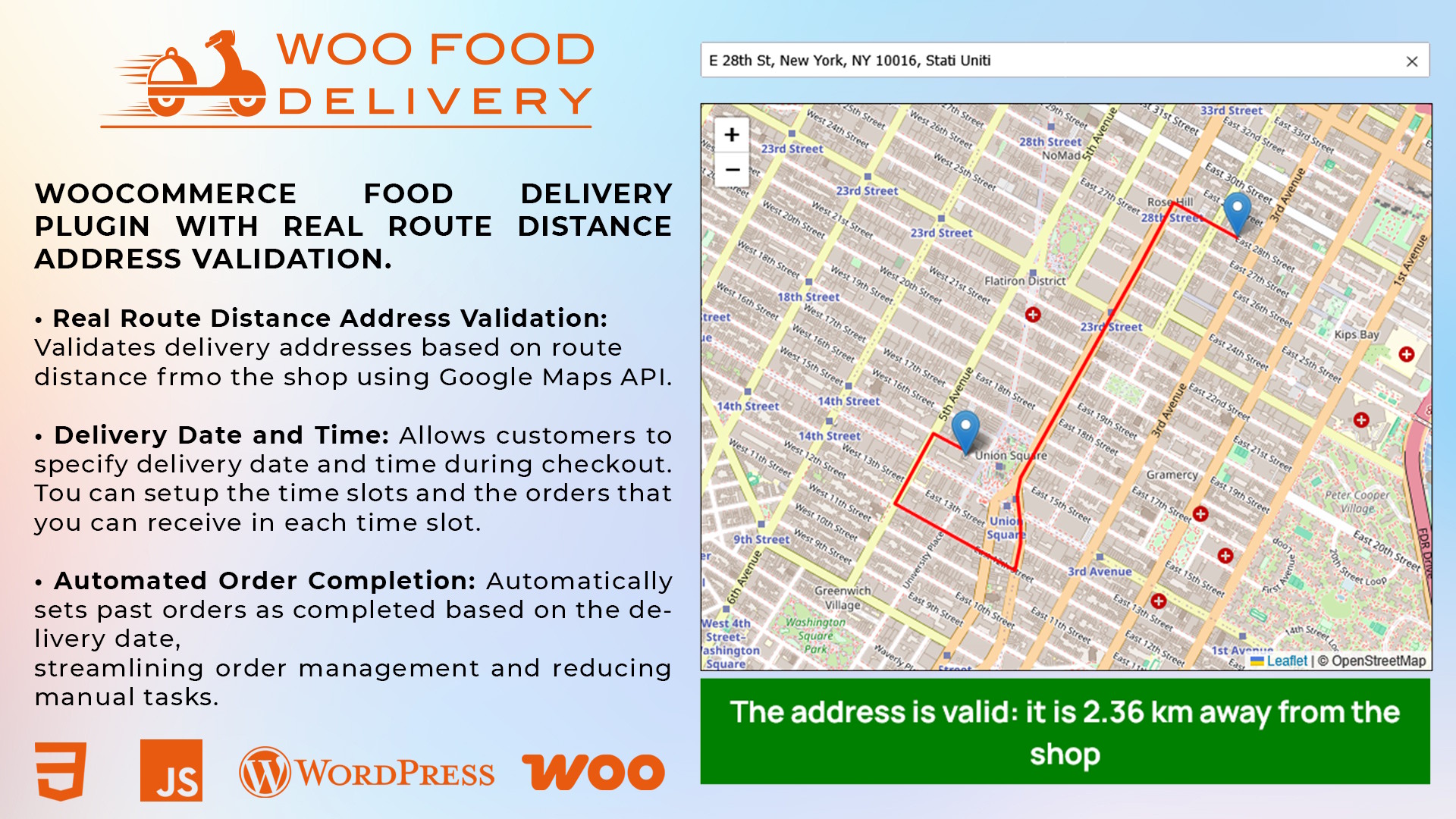
Woo Food Delivery is a comprehensive WordPress plugin designed to transform your WooCommerce store into a complete food delivery platform. Perfect for restaurants, pizzerias, cafes, and any food business offering home delivery services.
Full Checkout Compatibility
This plugin is fully compatible with both the classic WooCommerce checkout and the new Gutenberg block-based checkout. The plugin automatically detects which checkout type is active and adapts accordingly.
Why Choose Woo Food Delivery?
Smart Address Validation
Automatically validate customer addresses based on distance from your store using interactive maps.
Delivery Scheduling
Let customers choose delivery date and time with configurable slots and order capacity limits.
Kitchen Orders PDF
Generate professional kitchen order PDFs with all details for easy food preparation.
Allergen Management
Provide downloadable ingredients list for customers with allergies or dietary restrictions.
Minimum Order Amount
Set minimum cart value required to accept orders and ensure profitability.
Custom Messages
Display custom messages for closures, promotions, or important notices.
Universal Checkout Support
Works seamlessly with both classic and block-based WooCommerce checkout systems.
Features
Address Validation
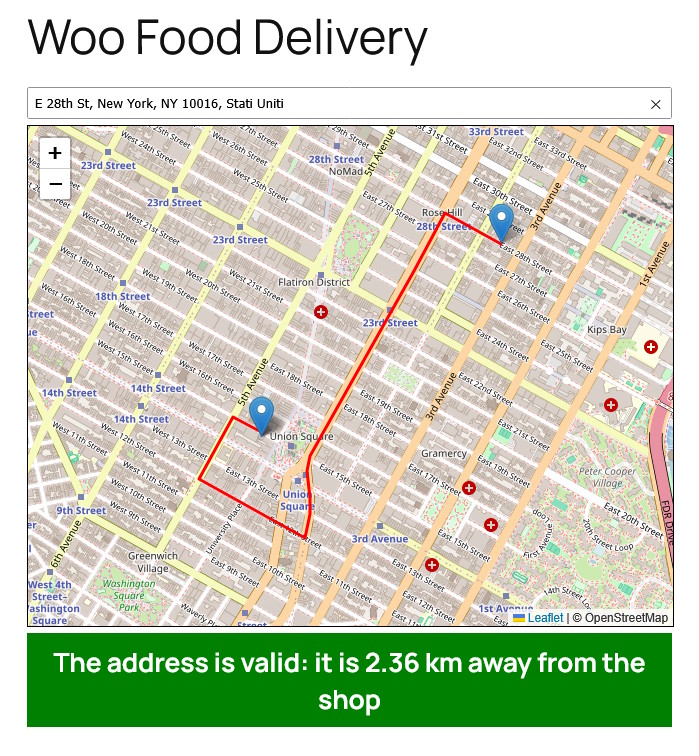
- Interactive Map Integration - Powered by Leaflet.js and OpenStreetMap
- Route Calculation - Uses Graphopper API to calculate actual road distance
- Visual Feedback - Show delivery route on map with customizable colors
- Distance Validation - Automatically reject addresses beyond delivery range
- Geolocation Support - Let customers use their device location
- House Number Check - Ensure complete addresses with house numbers
- City Restriction - Optionally limit deliveries to specific cities
- Google Maps Integration - For accurate address geocoding
Delivery Management
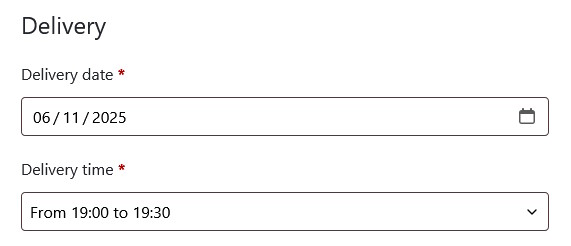
- Date Selection - Calendar picker for delivery date
- Time Slots - Fully configurable delivery time slots
- Order Capacity - Set maximum orders per time slot
- Smart Availability - Automatically hide full or past slots
- Minimum Preparation Time - Set required time before first available slot
- Additional Fields - Doorbell name, floor number, apartment number
- Required Fields - Make delivery details mandatory or optional
Kitchen Order PDF
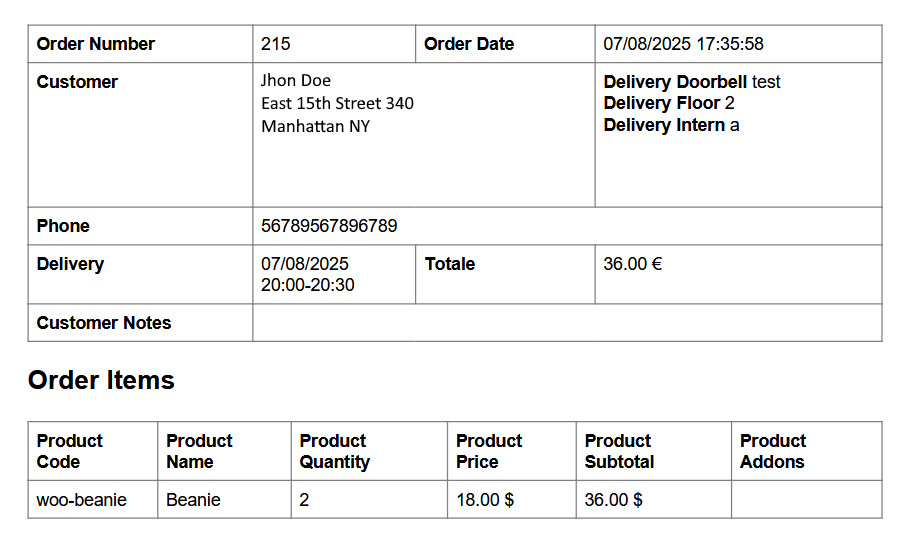
- One-Click Generation - Generate PDF from order list with single click
- Complete Order Details - Customer info, address, products, delivery time
- Product Variations - Includes all product variations and attributes
- YITH Integration - Special support for YITH Advanced Product Options
- Customer Notes - Display special requests and order notes
- Professional Layout - Clean, printer-friendly design
- Full Text Localization - Translate the PDF text in every language via PO files
Additional Features
| Feature | Description |
|---|---|
| Minimum Cart Value | Set minimum order amount with customizable error message |
| Ingredients List | Upload PDF with allergen information, display link on products |
| Custom Messages | Display announcements with custom colors above header or in shop |
| Auto Completion | Automatically complete orders after delivery date |
| Shortcode Support | Display address validator on any page with shortcode |
| Translation Ready | Full support for Loco Translate, WPML, and Polylang |
System Requirements
WordPress
Version 5.0+
WooCommerce
Version 3.0+
Classic & Block Checkout
PHP
Version 7.4+
PHP 8.0+ recommended
MySQL
Version 5.6+
Required API Keys (Free Plans Available)
The plugin requires two API keys to function properly. Both services offer generous free plans that are sufficient for most small to medium food delivery businesses.
Graphopper API
Used for route calculation and distance validation.
Free Plan: 500 requests per day
Get your key: https://graphhopper.com/dashboard
How to Get Your Graphopper API Key:
-
Sign Up for Free Account
Visit https://graphhopper.com/dashboard/#/signup and create a free account using your email address.
-
Verify Your Email
Check your inbox for the verification email and click the confirmation link.
-
Access Your Dashboard
Once verified, log in to the Graphopper Dashboard at https://graphhopper.com/dashboard/
-
Get Your API Key
Your API key will be displayed on the dashboard homepage. Copy it and paste it into the plugin settings under Graphopper API Key
-
Monitor Usage
The dashboard shows your daily usage. The free plan includes 500 requests per day, which resets every 24 hours.
Google Maps API
Used for address geocoding and interactive map display.
Free Plan: $200 monthly credit (≈28,000 requests)
Get your key: https://console.cloud.google.com
Required Libraries:
- Maps JavaScript API - For displaying the interactive map
- Geocoding API - For converting addresses to coordinates
How to Get Your Google Maps API Key:
-
Create Google Cloud Project
Visit https://console.cloud.google.com/ and sign in with your Google account. Click on "Select a project" at the top, then "New Project". Give it a name (e.g., "Food Delivery") and click "Create".
-
Enable Billing
Go to Billing in the left menu and set up a billing account. Don't worry - you get $200 free credit per month and won't be charged unless you exceed this amount.
-
Enable Maps JavaScript API
In the left menu, go to APIs & Services > Library. Search for "Maps JavaScript API" and click on it. Click the "Enable" button.
-
Enable Geocoding API
Go back to APIs & Services > Library. Search for "Geocoding API" and click on it. Click the "Enable" button.
-
Create API Key
Go to APIs & Services > Credentials. Click "Create Credentials" and select "API Key". Your new API key will be displayed.
-
Restrict API Key (Recommended)
Click on the API key name to edit it. Under "Application restrictions", select "HTTP referrers (web sites)". Add your website URL (e.g., https://yourdomain.com/*). Under "API restrictions", select "Restrict key" and choose only "Maps JavaScript API" and "Geocoding API". Click "Save".
-
Copy API Key to Plugin
Copy your API key and paste it into the plugin settings under Google Maps API Key.
Important: API Key Security
Always restrict your Google API key to your domain and only enable the specific APIs you need. This prevents unauthorized usage and protects your free credit.
Common Issue: If you see a REQUEST_DENIED error, make sure:
- Both Maps JavaScript API and Geocoding API are enabled in your Google Cloud project
- Your API key restrictions include your website domain (e.g., https://yourdomain.com/*)
- Billing is enabled on your Google Cloud project (even for free tier)
- The API key has permissions for both required APIs
Installation
Method 1: WordPress Admin (Recommended)
-
Download the Plugin
Download the woo-food-delivery.zip file from CodeCanyon.
-
Upload to WordPress
Go to Plugins > Add New > Upload Plugin in your WordPress admin panel.
-
Select ZIP File
Click "Choose File" and select the downloaded ZIP file.
-
Install and Activate
Click "Install Now" and then "Activate Plugin".
-
Verify Installation
You should see a new "Food Delivery" menu item in your WordPress sidebar.
Method 2: FTP Upload
- Extract the ZIP file on your computer
- Upload the woo-food-delivery folder to /wp-content/plugins/ via FTP
- Go to Plugins in WordPress admin
- Find "Woo Food Delivery" and click "Activate"
Installation Complete!
After activation, proceed to the Configuration section to set up your delivery service.
Configuration
Access plugin settings by clicking Food Delivery in the WordPress admin menu.
Section 1: Address Validation
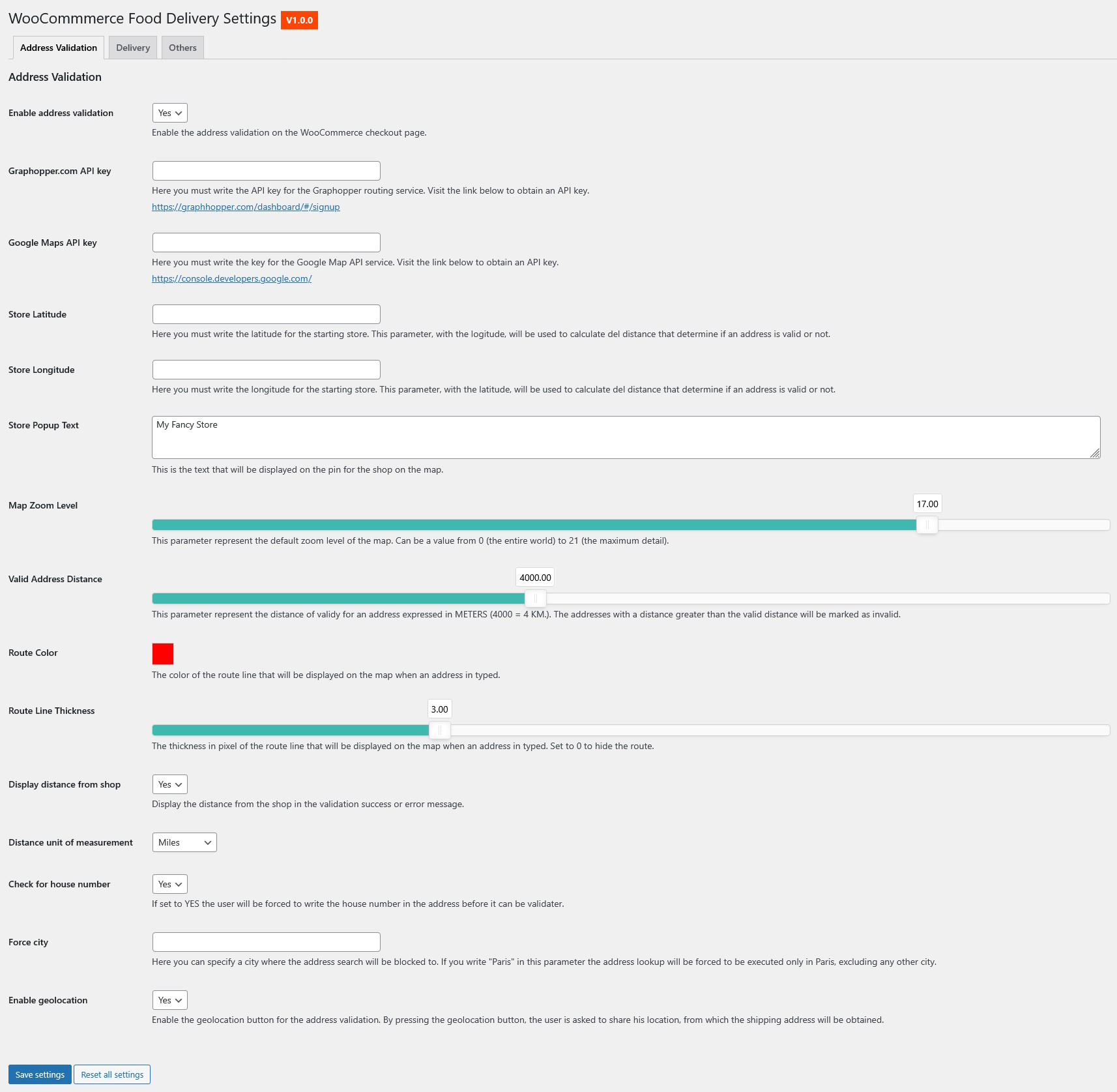
| Setting | Description | Default |
|---|---|---|
| Enable Address Validation | Turn address validation on/off on checkout page | Yes |
| Graphopper API Key | API key from graphopper.com for route calculation | Example key |
| Google Maps API Key | API key from Google Cloud Console for geocoding | Example key |
| Store Latitude | Your store's latitude coordinate (decimal format) | 43.77032 |
| Store Longitude | Your store's longitude coordinate (decimal format) | 11.27407 |
| Store Popup Text | Text shown in store marker popup on map | "My Fancy Store" |
| Map Zoom Level | Default map zoom (0-21, recommend 17 for street view) | 17 |
| Valid Address Distance | Maximum delivery distance in METERS | 4000 (4 km) |
| Route Color | Color of route line on map (hex code) | #ff0000 (red) |
| Route Line Thickness | Route line thickness in pixels (0 to hide) | 3 |
| Display Distance | Show actual distance in validation message | Yes |
| Distance Unit | Kilometers or Miles | Kilometers |
| Check for House Number | Require house number in address | Yes |
| Force City | Limit address search to specific city (optional) | Empty |
| Enable Geolocation | Show "Use my location" button | Yes |
Pro Tip: Finding Your Store Coordinates
- Open Google Maps
- Search for your store address
- Right-click on the marker
- Click the coordinates to copy them
- First number = Latitude, Second number = Longitude
Section 2: Delivery Management
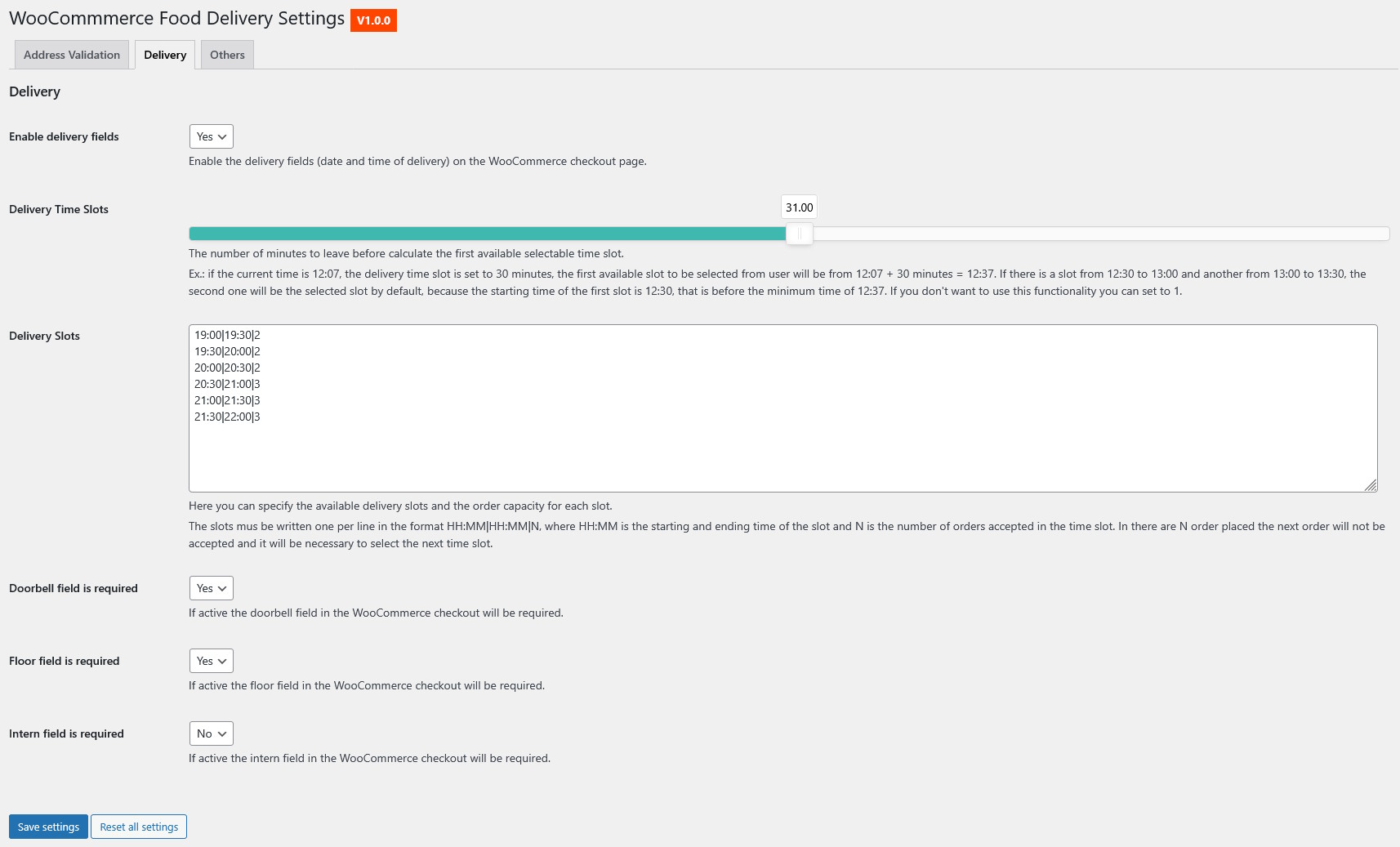
| Setting | Description | Default |
|---|---|---|
| Enable Delivery Fields | Show delivery date/time fields on checkout | Yes |
| Delivery Time Slots | Minutes before first available slot (preparation time) | 30 minutes |
| Delivery Slots | Available time slots (format: HH:MM|HH:MM|capacity) | See example below |
| Doorbell Required | Make doorbell name field mandatory | Yes |
| Floor Required | Make floor number field mandatory | Yes |
| Intern Required | Make apartment number field mandatory | No |
Delivery Slots Configuration Example:
19:00|19:30|2
19:30|20:00|2
20:00|20:30|2
20:30|21:00|3
21:00|21:30|3
21:30|22:00|3
Slots Format Explained
Format: StartTime|EndTime|Capacity
Example: 19:00|19:30|2
- 19:00 = Slot start time (7:00 PM)
- 19:30 = Slot end time (7:30 PM)
- 2 = Maximum 2 orders in this slot
When a slot reaches capacity, it automatically becomes unavailable for new orders.
Section 3: Other Features
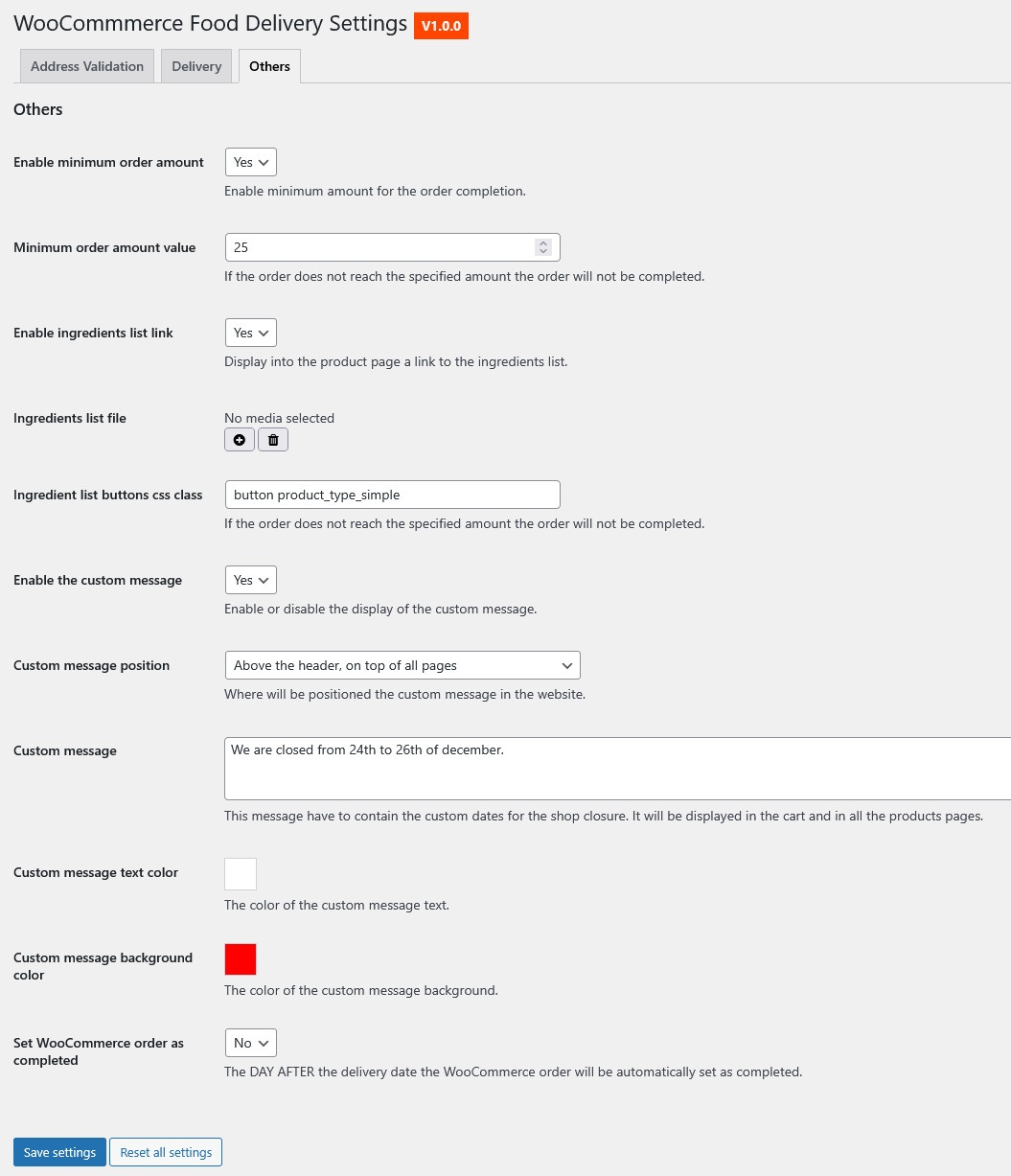
| Setting | Description | Default |
|---|---|---|
| Enable Minimum Amount | Require minimum cart value | Yes |
| Minimum Amount Value | Minimum order amount (in your currency) | 25 |
| Enable Ingredients List | Show ingredients/allergens link on products | Yes |
| Ingredients List File | Upload PDF with ingredients information | None |
| Button CSS Class | CSS classes for ingredients button styling | "button product_type_simple" |
| Enable Custom Message | Display custom announcement message | Yes |
| Message Position | Where to show message (header/shop/both) | Both |
| Custom Message Text | The message content | "We are closed..." |
| Message Text Color | Text color (hex code) | #ffffff (white) |
| Message Background Color | Background color (hex code) | #ff0000 (red) |
| Auto-Complete Orders | Set orders as completed after delivery date | No |
Usage Guide
Customer Experience (Frontend)
Checkout - Address Validation
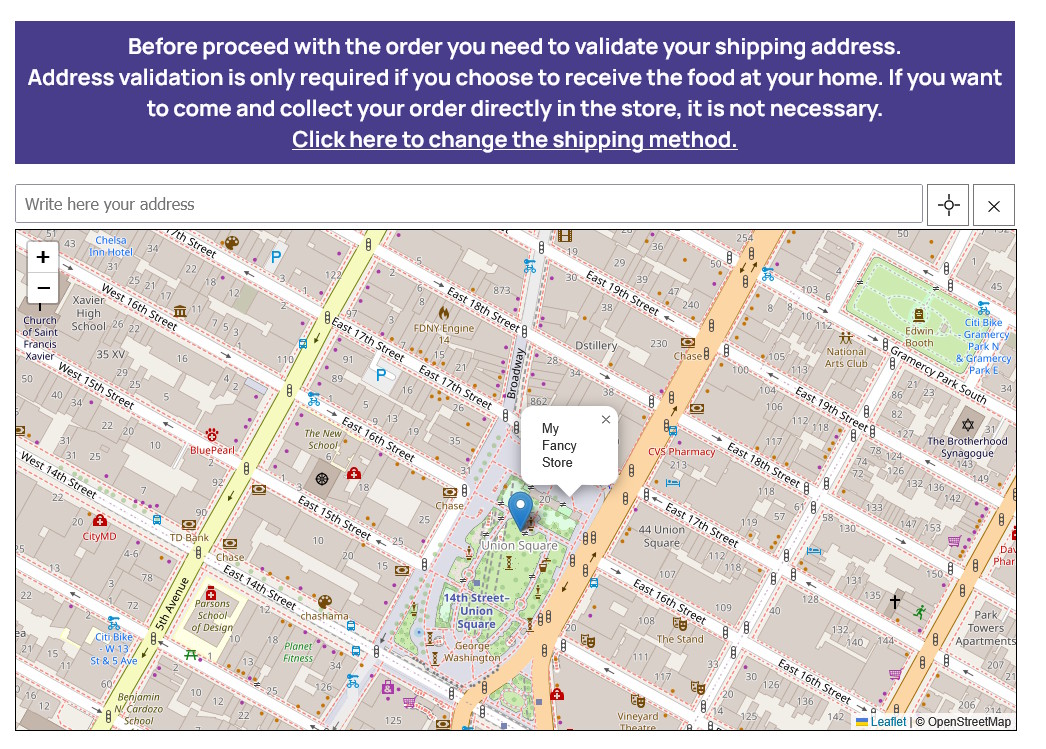
- Customer enters address in search field
- Dropdown shows address suggestions
- Customer selects correct address
- Map displays route from store to delivery address
- Green success message if address is within delivery range
- Red error message if address is too far
- Address fields automatically filled if valid
- The cross icon at the right og the address input box let you activate the Geolocation of your device, so the address will automatically fill with the geolocated position
Valid Address Example
Message: "The address is valid, located 2.5 km from the store"
Checkout proceeds normally with auto-filled address fields.
Invalid Address Example
Message: "The address is not valid, located 6.8 km from the store"
Customer must enter a different address to proceed.
Delivery Date & Time
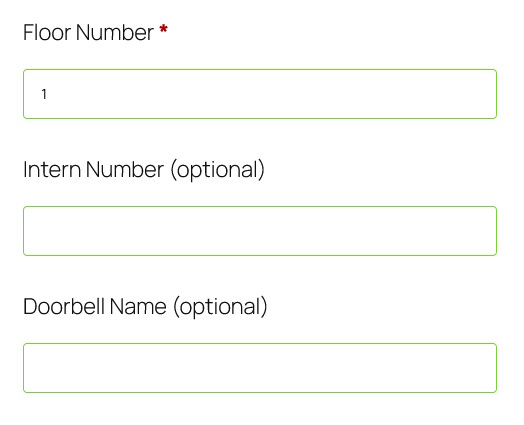
- Select delivery date (today or future)
- Choose time slot from available options
- Enter doorbell name
- Enter floor number
- Enter apartment number (if required)
Admin Experience (Backend)
Viewing Orders
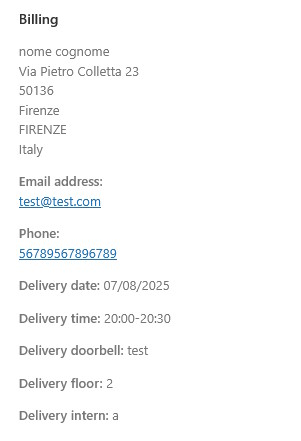
In WooCommerce > Orders, each order displays:
- Delivery date
- Delivery time slot
- Doorbell name
- Floor number
- Apartment number
Generating Kitchen Order PDF
Recommended size: 1200x400px
- Go to WooCommerce > Orders
- Find the order you want to print
- Click the document icon in Actions column
- PDF opens automatically in new tab
- Print or save for kitchen use
Shortcodes
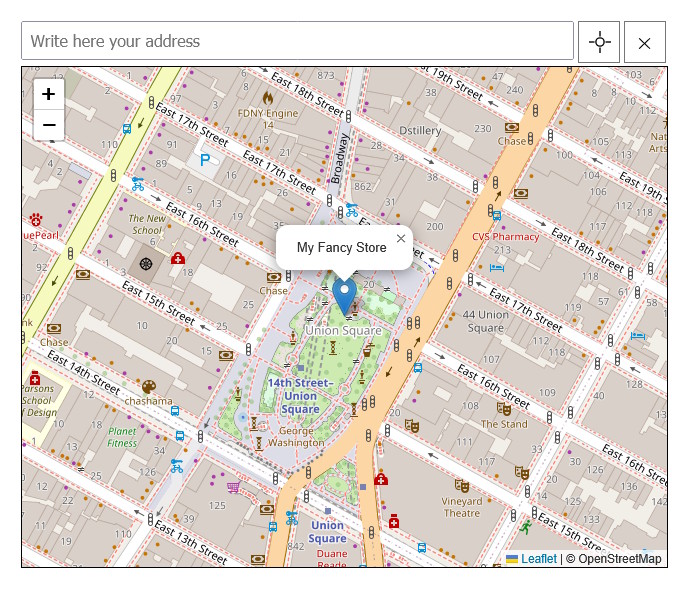
[woo-food-delivery]
Display the address validator map on any page or post.
Basic Usage:
[woo-food-delivery]With Custom Parameters:
[woo-food-delivery
    uid="homepage-map"
    placeholder_text="Enter your delivery address"
    clear_address_message="Clear address"
    geolocation_message="Use my location"
    softwall_message="Validating..."]
Available Parameters:
| Parameter | Description | Default |
|---|---|---|
| uid | Unique identifier for the map instance | Auto-generated |
| placeholder_text | Placeholder text for address input | "Write here your address" |
| clear_address_message | Text for clear address button | "New address" |
| geolocation_message | Text for geolocation button | "Get your position" |
| softwall_message | Loading message during validation | "Validating address..." |
Use Cases:
- Homepage: Let visitors check if you deliver to them before browsing
- "Delivery Area" Page: Dedicated page showing coverage area
- Footer: Quick access from any page
- Popup/Modal: Exit intent popup to capture non-deliverable visitors
Frequently Asked Questions
Q: Does this work with WooCommerce block checkout?
A: Yes! The plugin is fully compatible with both the classic WooCommerce checkout and the new Gutenberg block-based checkout. The plugin automatically detects which checkout type is active and seamlessly integrates with both systems.
Q: Do I need to pay for the API keys?
A: Both Graphopper and Google Maps offer generous free plans:
- Graphopper Free: 500 requests per day
- Google Maps Free: $200 monthly credit (≈28,000 requests)
For most small to medium food delivery businesses, the free plans are sufficient.
Q: Can I have different time slots for different days?
A: Currently, the plugin uses the same time slots for all days. Different slots per weekday/weekend would require custom development.
Q: Is the plugin translation-ready?
A: Yes! The plugin is fully compatible with:
- Loco Translate
- WPML
- Polylang
- .po/.mo translation files
Q: Can I customize the kitchen PDF template?
A: Yes, the template is located at /admin/partials/kitchen_order.html. However, modifications will be lost on updates. Consider using child plugins or hooks for permanent customizations.
Q: Does the plugin slow down my site?
A: No. The plugin loads map libraries only on checkout pages and pages with the shortcode. It has minimal impact on overall site performance.
Q: Can customers order for pickup instead of delivery?
A: The plugin is focused on delivery. For pickup options, you'd need to either disable address validation for pickup orders or use WooCommerce's built-in local pickup shipping method.
Q: What happens when a time slot is full?
A: When a slot reaches its maximum capacity, it automatically becomes unavailable and won't appear in the time slot dropdown for new orders.
Q: Can I set different delivery fees based on distance?
A: The plugin validates addresses but doesn't directly control shipping costs. You can use the calculated distance with other WooCommerce shipping plugins for distance-based pricing.
Q: How do I find my store coordinates?
- Go to Google Maps
- Search for your store address
- Right-click on the location marker
- Click on the coordinates to copy them
- First number = Latitude (e.g., 43.77032)
- Second number = Longitude (e.g., 11.27407)
Q: Can I limit deliveries to specific zip codes or neighborhoods?
A: The plugin uses distance-based validation. For zip code restrictions, you can use the "Force City" option to limit to one city, but specific zip code filtering would require custom development.
Compatibility
Tested With
WordPress
5.0 - 6.4+WooCommerce
3.x - 8.xClassic & Block Checkout
PHP
7.4 - 8.4Compatible Themes
- Storefront
- Astra
- OceanWP
- GeneratePress
- Kadence
- Flatsome
- Any theme that follows WooCommerce standards
Compatible Plugins
- YITH WooCommerce Advanced Product Options Premium - Full integration for product addons
- Loco Translate - Easy translation management
- WPML - Multi-language support
- Polylang - Multi-language support
- WooCommerce PDF Invoices & Packing Slips
- WooCommerce Email Customizer
Changelog
Version 1.0.0 - December 10, 2025
- Initial Release
- Address validation with Leaflet + OpenStreetMap
- Delivery date and time scheduling
- Configurable time slots with capacity limits
- Kitchen order PDF generation
- Google Maps API integration
- Graphopper routing integration
- Minimum order amount validation
- Ingredients/allergens list support
- Custom message system
- Automatic order completion
- Shortcode for address validator
- YITH Advanced Product Options integration
- Translation ready (WPML, Loco Translate, Polylang)
- WooCommerce 3.x - 8.x compatibility
- Full support for both classic and block-based WooCommerce checkout
- Optimized API call management with debouncing
- Enhanced address validation with single API call per address
Support & Documentation
Email Support
For technical questions and support requests:
wpsupport@ego.it
Demo Website
The demo website allow you to create a complete website to securely test the plugin and all its functionalities.
Before Requesting Support
- Verify your API keys are correctly configured
- Clear your site and browser cache
- Check browser console (F12) for JavaScript errors
- Review the documentation and FAQ section
- Try disabling other plugins to check for conflicts
- Note which checkout type you're using (classic or block-based) when reporting issues
When Reporting Issues
Please provide:
- WordPress version
- WooCommerce version
- PHP version
- Active theme name
- List of active plugins
- Description of the issue
- Steps to reproduce
- Screenshots if applicable
- Browser console errors (if any)
Rate This Item
If you're happy with this plugin, please leave a 5-star rating on CodeCanyon! Your feedback helps improve the plugin and helps other users make informed decisions.
Credits & Licenses
Plugin License
GPL 2.0 - https://www.gnu.org/licenses/old-licenses/gpl-2.0.en.html
Third-Party Libraries
| Library | License | URL |
|---|---|---|
| Leaflet.js | BSD-2-Clause | GitHub |
| Leaflet Routing Machine | ISC | GitHub |
| Vanilla Picker | ISC | GitHub |
| Font Picker | MIT | GitHub |
| noUiSlider | MIT | Website |
| Dompdf | LGPL 2.1 | GitHub |
External Services
- OpenStreetMap - Map tiles (Free)
- Graphopper API - Route calculation (Freemium)
- Google Maps API - Geocoding and Places (Freemium)